
.png)

Description
Download CircuPress – WordPress Email Newsletter Tool, Free & Secure
Overview
CircuPress is a purpose‑built WordPress plugin that puts the power of email newsletters directly inside your website’s dashboard. For site owners who are tired of juggling between the WordPress editor and an external email client, CircuPress eliminates the copy‑and‑paste hassle by letting you compose, schedule, and send emails without ever leaving WordPress. The interface mirrors the familiar block editor, so you can draft a message with the same ease you use for a blog post. Once your email is ready, you choose a subscriber list, set a send time, and let the system handle the delivery. The plugin also tracks basic metrics such as open rates and click‑throughs, giving you immediate feedback on how your audience engages with your content. Because it runs as a native WordPress extension, it respects your existing user roles and permissions, ensuring that only authorized editors can send communications. Whether you run a small blog, a membership site, or a full‑blown e‑commerce store, CircuPress provides a secure, integrated way to keep your subscribers informed and your brand top‑of‑mind—all without the need for a separate email service provider.
Key Features
- Native WordPress editor integration – compose emails using the same block editor you already love.
- One‑click subscriber selection – pull from any registered WordPress user role or custom list.
- Schedule future deliveries – set date and time for automated campaigns.
- Real‑time analytics – view open rates, click‑through percentages, and bounce statistics.
- Responsive templates – mobile‑friendly designs that adapt to any device.
- GDPR‑compliant opt‑in handling – ensure all subscriber data respects privacy regulations.
- Unlimited email drafts – save drafts for later editing or reuse in future campaigns.
- Multilingual support – compatible with WPML and Polylang for global audiences.
- Secure API communication – encrypted transmission to avoid spam filters and protect data.
- Free core version – no hidden fees for basic newsletter functionality.
Each feature has been engineered to reduce friction for content creators. The block‑based composer means you can drag‑and‑drop images, headings, and call‑to‑action buttons exactly as you would on a page. Subscriber selection leverages WordPress’s built‑in user database, so you never need a third‑party list manager. Scheduling works on your server’s timezone, and the system automatically adjusts for daylight‑saving changes. Analytics are displayed inside a clean dashboard widget, allowing you to compare campaign performance at a glance. The responsive templates are built with modern CSS, guaranteeing that your newsletters look polished on smartphones, tablets, and desktops alike. For sites that operate internationally, the multilingual compatibility ensures that language‑specific newsletters reach the right audience without manual duplication. All of these capabilities are delivered through a free core plugin, with premium add‑ons available for advanced automation and CRM integration.
Installation & Usage Guide
Step‑by‑Step Installation
1. Log into your WordPress admin panel.
2. Navigate to Plugins > Add New.
3. Search for “CircuPress” in the plugin repository.
4. Click Install Now and then Activate once the installation finishes.
5. A new menu item “CircuPress” will appear in the left‑hand navigation.
Creating Your First Email
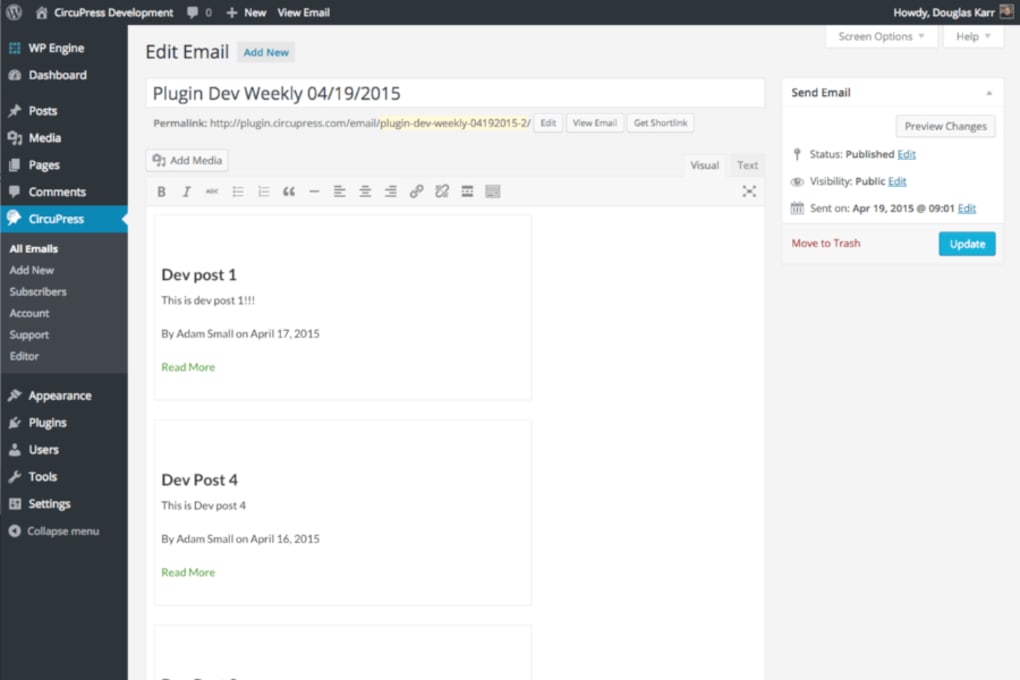
After activation, select CircuPress > New Email. The editor opens with a blank canvas that mirrors the Gutenberg block editor. Add a heading block for the subject line, then insert paragraph, image, and button blocks to build your content. Use the “Subscriber List” dropdown to choose who will receive the email – you can pick all users, a specific role (e.g., “Subscriber”), or a custom list you have previously defined. Once satisfied, click Save Draft or Send Immediately. If you prefer to schedule, click the calendar icon, select a future date and time, and confirm. CircuPress will queue the email and dispatch it at the specified moment.
Monitoring Performance
After an email is sent, return to CircuPress > Campaigns to view a summary table. Each row shows delivery status, open rate, click‑through rate, and any bounces. Clicking a row expands a detailed view with a list of recipients who opened the email and the links they clicked. This data helps you refine future newsletters, test subject lines, and identify high‑engagement content. For deeper analysis, export the report as a CSV file and import it into your favorite spreadsheet tool.
Compatibility & System Requirements
CircuPress is built to work with any self‑hosted WordPress installation that meets the standard minimum requirements. Specifically, it requires:
- WordPress version 5.6 or higher (tested up to the latest 6.x release).
- PHP 7.4 or newer – PHP 8.0 is recommended for optimal performance.
- MySQL 5.6+ or MariaDB 10.1+.
- HTTPS enabled on your site for secure email transmission.
Because CircuPress runs entirely within WordPress, it is OS‑agnostic. Whether your server runs on Windows, macOS, or Linux, as long as the above software stack is present, the plugin will function correctly. It also coexists peacefully with popular page‑builder plugins such as Elementor, Beaver Builder, and Divi, because it leverages the native block editor for email composition. For multisite networks, CircuPress can be activated network‑wide, allowing each sub‑site to manage its own subscriber lists and email campaigns independently. Lastly, the plugin respects WordPress’s built‑in cron system for scheduling; if your host disables wp‑cron, you can configure a server‑side cron job to ensure scheduled emails are sent on time.
Pros and Cons
Pros
- Fully integrated with the WordPress dashboard – no external email client needed.
- Free core version provides essential newsletter functionality.
- Intuitive block‑based editor mirrors familiar content creation workflow.
- Robust scheduling and automation for time‑sensitive campaigns.
- Built‑in analytics give instant feedback on engagement.
- GDPR‑compliant subscriber handling for privacy‑focused sites.
- Responsive email templates ensure consistent appearance across devices.
- Compatible with multilingual plugins for global audiences.
Cons
- Advanced CRM integrations require paid add‑ons.
- Large mailing lists may need a dedicated SMTP service to avoid deliverability issues.
- No built‑in A/B testing; users must run separate campaigns manually.
- Limited template library in the free version.
CircuPress delivers a seamless email creation experience for WordPress users, removing the need for external tools. Its free tier covers most basic newsletter needs, while premium extensions add powerful automation. The main drawback is the reliance on an external SMTP provider for very large lists, but overall it’s a solid, secure choice for site owners looking to keep communications in‑house.
Frequently Asked Questions
Is CircuPress really free to use?
Yes, the core plugin is free and includes unlimited email drafts, scheduling, and basic analytics. Premium add‑ons are optional for advanced features.
Can I send newsletters to non‑WordPress users?
CircuPress uses the WordPress user database for subscriber lists, but you can import external email addresses via CSV through the plugin’s “Import List” feature.
Do I need an SMTP service?
For small to medium lists the built‑in mail function works fine, but using a reputable SMTP provider improves deliverability and avoids spam filters for larger campaigns.
How does CircuPress handle GDPR compliance?
The plugin respects the consent status stored in user meta fields and provides an opt‑out link in every email, ensuring you meet EU privacy regulations.
Can I track clicks on specific links?
Yes, CircuPress automatically appends tracking parameters to each link and displays click‑through statistics in the campaign dashboard.
Conclusion & Call to Action
If you’re a WordPress site owner looking to streamline your email marketing, CircuPress offers a secure, integrated solution that eliminates the need for separate newsletter services. Its block‑based editor, scheduling capabilities, and real‑time analytics make it easy to keep subscribers engaged while staying inside the familiar WordPress environment. The free core version is more than enough for most blogs and small businesses, and the optional premium extensions let you scale as your audience grows. Ready to simplify your newsletter workflow? Download CircuPress today and start sending professional emails directly from your WordPress dashboard.
Guides & Tutorials for CircuPress
How to install CircuPress
- Click the Preview / Download button above.
- Once redirected, accept the terms and click Install.
- Wait for the CircuPress download to finish on your device.
How to use CircuPress
This software is primarily used for its core features described above. Open the app after installation to explore its capabilities.
User Reviews for CircuPress 0
No reviews found




